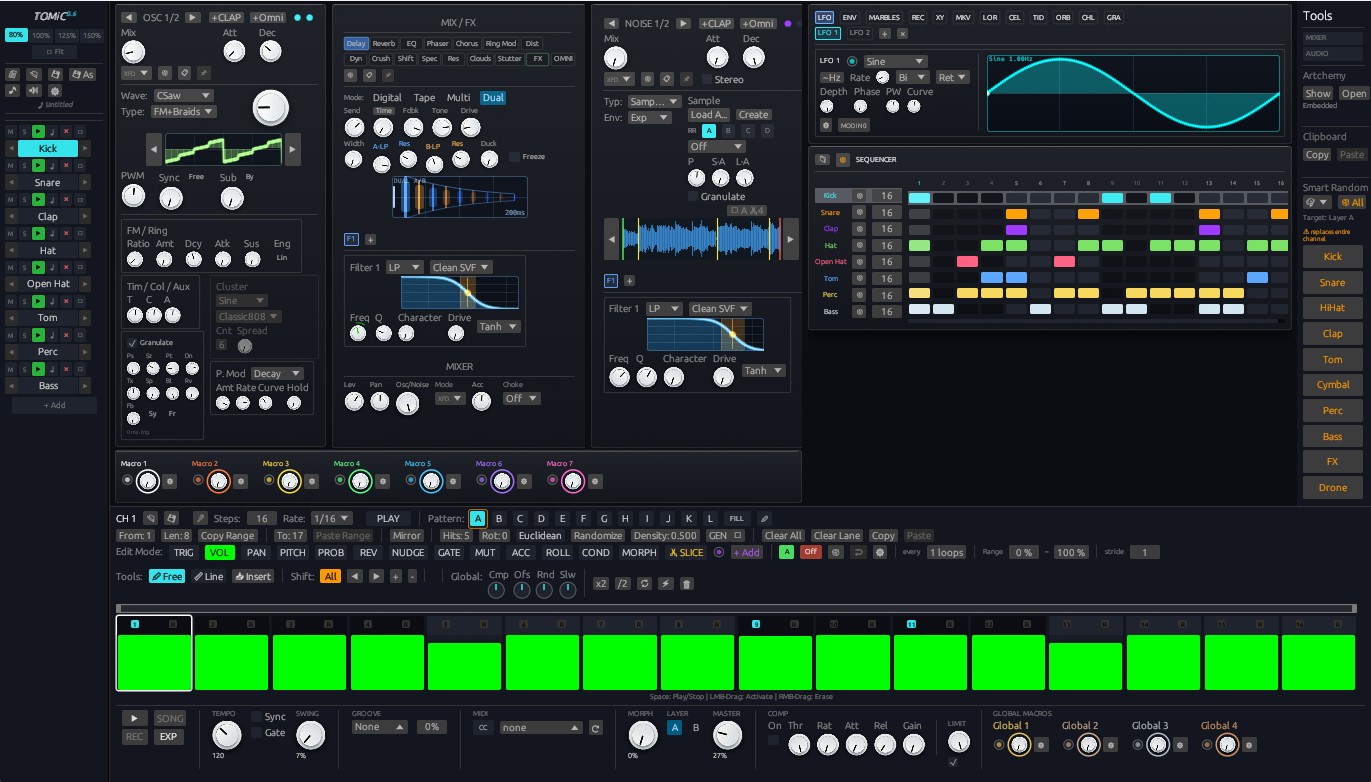
🔮 Modulator System and Routing
The Omni DAW modulation system allows you to assign any modulator (LFO, envelope, chaotic generator, gravity physics, script...) to any synthesizer, effect, or mixer parameter on a given track.
1. Available Modulators (15 Generators)
1. Classic LFO
A low-frequency oscillator with 9 shapes: Sine, Triangle, Ramp Up, Ramp Down, Square, Pump (drops at the start of the cycle and recovers exponentially — the classic pumping curve), Sample & Hold, Smooth Random and Handmade (a hand-drawn 256-point cycle with Hermite interpolation; draw with the pencil right on the display or in the large editor).
- Timing: Hz (0.01–50 Hz) or SYNC with divisions from 4 bars to 1/32 in STR / DOT / TRI feels (straight, dotted, triplet). While synced the LFO position follows the song position, so after a seek and in a bounce it sounds exactly like continuous playback. With the transport stopped it keeps running at the project tempo and snaps onto the bar grid when playback starts.
- RETRIG restarts the cycle on every note (also while synced: the cycle starts at the note instead of the bar line), 1-SHOT plays one cycle and holds its end value.
- Shape: Skew (pulse width for Square, ramps from Triangle, asymmetric sine), Bend (exponential tension of the level), Smooth (slew relative to the cycle length — rounds edges, glides S&H), Grid (samples the shape N times per cycle — steps from any shape), Steps (quantizes to N levels; 12 levels on a one-octave routing give a chromatic arpeggio).
- Output: polarity (± / + / −), Depth, Bias (offset), Delay and Fade after a (re)start, Phase, Drift (slow analog phase wander — locked to the grid on average). Seed sets the random shapes and the drift; random values are a function of seed and cycle number, so they are repeatable.
- The display draws one cycle with the same code the engine runs (smoothing included) and the real live output with a trail; next to it a scope shows the last 3 seconds of output and the reachable range. The diamond on the top edge sets Skew, the handle on the right edge sets Bend, dragging the curve slides the phase, double-click resets.
2. Macro
A manual, bipolar modulation knob that can be routed to multiple targets simultaneously.
3. ADSR Envelope
A DAHDSR envelope triggered by MIDI notes: Delay, Attack, Hold, Decay, Sustain, Release. Every stage lasts exactly the time you set, its shape set by a curve (positive = fast start like an analog RC, negative = slow start, 0 = linear).
- Times: in ms or SYNC (divisions from 1/64 to 8 bars, triplets and dotted included). Fade slowly fades the sustain while held (−60 dB at the set time).
- Notes: the release starts only when the last held note is let go, and notes act on their exact sample — the envelope sounds the same at any buffer size and in a bounce. RETRIG restarts from the current level (the attack continues from that point of its curve, no jump), RESET from zero, LEGATO only on the first note of a phrase.
- GATE / 1-SHOT: in 1-SHOT mode the note length does not matter — the envelope runs through every stage to the end. Loops: AD cycles between the peak and the sustain, ADR through the whole envelope down to zero, while the note is held.
- Output: Depth (negative inverts), unipolar or bipolar, Vel (velocity → depth), Vel→A (harder notes attack faster, up to 8×), Key (key tracking of the times — shorter higher up).
- The display draws the envelope with the same code the engine runs: nodes at the end of every stage set its time (the decay node also sets the sustain level, Shift on the attack node sets the hold), diamonds in the middle of A/D/R bend the curves, double-click resets. The current stage lights up, a dot shows the real level, and a release from a level other than the sustain is drawn as a ghost; next to it a 3-second scope with a band of held notes. The NOTE key plays a note into this envelope only.
- Older projects keep their original analog RC timing (the RC τ badge); one click converts it to exact stage times with matching curves.
4. Random
Stepped random CV: every step draws a new value and the modulator jumps to it (S&H) or moves there along one of five curves: S-Curve, Linear, Exponential (analog RC slew), Spline (a smooth curve through the values, no corners) and Woggle (a resonant slew that overshoots and rings into each value). Smooth sets the length of the transition relative to the step.
- Clock: FREE (Hz, restarts when playback starts), SYNC (step length from 4 bars to 1/32, STR / DOT / TRI; the position follows the song position, so seeks, loops and bounces play exactly the same) or NOTE (a new value on every note, sample-accurate; the rate then sets the transition time). RETRIG starts the sequence from the note.
- Values: Walk (0 = independent, ½ = pink noise, 1 = a slow wander in small steps), Spread (negative gathers the values around the centre, positive pushes them to the edges), Levels (quantize to N levels; 2 = a coin flip ±1).
- Time: Jitter (each step starts randomly early or late, up to ±45 %), Chance (the chance a step draws a new value — otherwise it holds the previous one; 0 freezes the output).
- Loop: the sequence repeats every N steps (1–64); Mutate is the chance a looped step draws a new value on each pass (Turing Machine style — 0 = locked loop).
- Output: polarity (± / + / −), Depth, Bias. Seed sets every random decision — each value is a function of the seed and the step number, so it is repeatable.
- Display scrolls the steps around the playhead, drawn by the engine's own code: the played output bright, the coming steps as a ghost (the draws are deterministic, so that is exactly what will play), sample points, rings for steps held by Chance, sparks for mutations, loop passes as bands and step starts moved by Jitter. Beside it the DIST lens shows the distribution of the values and the latest draws. Drag sideways to set Smooth, double-click for a new seed.
5. Marbles
A random generator inspired by the Mutable Instruments Marbles module, providing controlled value scatter.
6. Step Seq
A CV step sequencer with up to 256 steps. Every step has a value, a chance (a step that does not fire ties to the previous one — the value carries on without a new gate), ratchets (1–8 gate repeats within the step) and slide (glide into the step). Switch lanes with the VALUE / CHANCE / RATCH / SLIDE tabs and draw straight on the bars (Shift = fine, Ctrl = snap, right-click / double-click = reset).
- Timing: steps/s or SYNC (step length from 4 bars to 1/32, STR / DOT / TRI). While synced the position follows the song position — after a seek, in a loop and in a bounce it plays exactly the same. Swing (up to 75 %) delays every second step against the bar grid, Offset starts the pattern N steps in.
- Order: Forward, Reverse, Ping-Pong, Ping-Pong with repeated ends, Random, Drunk (a walk of one step at a time) and Shuffle (every step once per pass, in a new order).
- Glide: Exp / Linear / S-Curve curve, time in ms (0–200) or relative to the step (STEP) — ramps always land within the step.
- Gate shortens every step (or every ratchet); when it closes the output falls to the Rest level — with ratchets this gives rhythmic trance gates.
- Random blends the values towards new random ones every pass, Levels quantizes to N levels. Seed sets chance, random values and random orders — all of them are a function of the seed and the song step, so they are repeatable.
- RETRIG starts the pattern on a note (while synced: at the note instead of the bar line), 1-SHOT plays the pattern once and holds the last step.
- The display shows the pass that plays with the engine's own code: the played part bright, the coming part as a ghost (chance, random and ties included), fire markers under the bars, the route of non-linear orders and the playhead at the real output; beside it a scope of the last 3 seconds. Tools: shape generator, rotate, reverse, invert, randomize and clear the active lane.
7. Markov
A real Markov chain: 2–16 states and a 16 × 16 transition matrix (row = from, column = to). On every step the chain picks the next state from the current state's row, and the output follows the state's level (sample & hold or a glide).
- Topologies (keys showing their matrix): Walk (neighbours, a stepwise line), Drift (a bell around the state: mostly small moves, rare leaps; the default), Cycle (always on to the next), Leap (wide intervals), Home (everything leans back to the first state), Islands (lower and upper half with rare bridges), Chaos (sparse random weights), Flat (independent draws). A key lights up when the matrix is that topology.
- Matrix (MATRIX tab): each cell shows the real chance of its move in the target state's colour; click or drag to paint moves (the first cell sets the brush), the mouse wheel sets an exact weight, right-click opens row operations (clear, fill, randomize, only the likeliest move) and matrix operations (symmetrize, reverse time, invert, sharpen, randomize, topologies). The playing row is framed, the move just taken flashes, the next move is outlined.
- Levels and Hold (LEVELS tab): levels are spread evenly over the states by default; drag across the bars to draw your own (EVEN returns to the even spread). Hold 1–8: the state moves on only on steps divisible by its hold, so it lasts up to N steps and its changes stay on the N-step grid.
- Shaping the chain (modulatable live): Temp (− sharpens towards the likeliest move, + flattens towards any allowed move; zeros stay zero), Stay (+ adds repeats, −1 = never repeats a state), Gravity (leans moves towards low or high levels), Jump (chance a move ignores the matrix and lands on any state).
- Clock: FREE (Hz, restarts when playback starts), SYNC (4 bars … 1/32, STR / DOT / TRI, locked to the song position) or NOTE (one step per note). RETRIG restarts the chain on a note, so it plays the same phrase every time.
- Loop: the chain repeats every Length steps (1–32); Mutate is the chance a looped step draws a new move on each pass. The change ripples on until the chain finds its way back.
- Output: VAL (the state's level), SURP (surprise: how unlikely the last move was) or CHG (a gate on every change of state); polarity, Depth, Bias, glide S&H / S-Curve / Linear / Exp / Spline / Woggle with Smooth.
- Determinism: every draw is a function of the seed and the step, and moves are drawn so that chains with different pasts quickly meet. After a seek, in a song loop and in a bounce the chain lands exactly on the state continuous playback from the start of the song would play.
- Displays: the state network (states on a ring, size = share of the time, chords = move probabilities, the moves out of the playing state in their targets' colours, a spark running along the move just taken, a ghost on the next state; hover for numbers, click to select the row in the matrix; entropy per move in bits and the chain's memory on top) and the timeline (the played output bright, the deterministic future as a ghost, move dots in state colours, larger when surprising, rings for jumps, loop bands, mutation sparks, a surprise strip; drag sideways = Smooth, up/down = Temp, double-click = new seed).
- Older projects play their original network: a cycle 0 → 1 → … → 7 with the entropy as Jump.
8. Cellular
A cellular automaton read as a control signal. Two families:
- 1D (elementary, Wolfram): a row of up to 64 cells under a rule 0–255; the display shows its history as a space-time diagram (the newest generation on the "now" line, the coming ones below it as a ghost, the whole diagram scrolling up smoothly). Preset keys with the rule's thumbnail: 30, 90, 110, 45, 73, 54, 150, 184. The RULE tab shows the eight neighbourhood tiles (click to flip the result), the rule number drags through all 256, MIR mirrors left ↔ right and INV swaps live and dead.
- 2D (Life and relatives): a field up to 64 × 32 under a birth/survival rule (B and S keys for 0–8 neighbours) with 2–8 C states (Generations: a dying cell fades through the extra states and blocks births meanwhile). Presets: Life, HighLife, Day & Night, Seeds, Maze, Anneal, Brian's Brain, Star Wars.
- Read window: a rectangle on the field the output reads. Drag it to move, drag its corner to resize, drag elsewhere to draw a new one (also the Win X / Y / W / H knobs, all modulatable). Modes: DENS (density), X / Y (centre of mass; in 1D Y = age), ACT (activity: how much changed), BITS (the window's top row as a binary number, stepped values), GATE (high while anything lives), BIRTH (a trigger for every generation with a birth, rhythm).
- Evolution: WRAP (torus) or EDGE borders, Noise (random cell flips), Revive: OFF, SPARK (a random blob when the field dies or freezes into a still life or a period-2 oscillator for 8 generations), RESOW (a new random field).
- Seed: RND (Fill), SYM (mirrored), CTR (1D: one cell; 2D: a soup in the middle third), DRAW (drawn). In the SEED tab the big display becomes a canvas: paint cells (in 1D you see at once how the pattern unfolds); GRAB stores the generation playing as the seed, CLR, INV.
- Clock: FREE (Hz), SYNC (4 bars … 1/32, STR / DOT / TRI, locked to the song position) or NOTE (one generation per note), RETRIG. Loop: restart from the seed every Length generations (1–64); Mutate varies each pass's seed (0 = the same pass, 1 = a new random one).
- Output: glide S&H / S-Curve / Linear / Exp / Spline / Woggle with Smooth, Depth, Bias, polarity, Seed.
- Determinism: the field at every generation is a function of the parameters and the generation number, so after a seek, in a loop and in a bounce it plays exactly what continuous playback from the start of the song plays; the display draws the very cells you hear. A long jump is computed over a few blocks (SYNC… tag).
- Displays: the field as an LED matrix (births flash, dead cells leave an afterglow, cells about to be born or to die next generation are marked), tags for generation, rule, population and state (STILL, OSC 2, EXTINCT, SPARK), and the timeline: the output with its deterministic future as a ghost, the population as bars, loops and sparks; drag the timeline sideways = Smooth, up/down = Noise, double-click = new seed.
- Older projects play their original 1D automaton (the per-bar reset becomes a one-bar loop).
9. Granular
A deterministic cloud of value grains: many short, overlapping envelopes, each carrying its own value.
- Emission: a clock of grain slots, FREE (Hz, restarts when playback starts), SYNC (4 bars … 1/32, STR / DOT / TRI, locked to the song position) or NOTE (every note-on emits a grain at its velocity; the rate sets the grains' time scale), RETRIG. Chaos morphs from a clock (one grain on every slot start) to a Poisson process (random counts and times, same mean rate); Chance thins the emissions; Cluster adds up to 7 ratchets evenly subdividing the slot, each a little quieter. Loop repeats the cloud every Length slots (1–64), Mutate is the chance a looped slot plays new grains on a pass.
- Grain: six windows (Hann, Gauss, Tukey, Triangle, Expo, Pulse) with Skew (peak at the start = percussive, at the end = swell); Size is the grain length as a multiple of the slot, i.e. the average number of overlapping grains; Var and Amp Var vary length (×/÷ 4) and level per grain.
- Value: Center, Range, Spread (bell … uniform … edges), Drift (correlation of successive grains: white … pink … Brownian), Motion (each grain glides along a random slope), Levels (quantizer).
- Combine: SUM (a swarm of bumps; the sum is scaled by the cloud's statistics, so density builds texture instead of clipping), BLEND (the output glides between the values of the grains sounding, holds between them and relaxes to Center after a long silence), PEAK (the loudest grain wins: full-height bursts at any density). Depth, Bias, polarity, Seed.
- Determinism: every grain is a function of the seed and its slot, so after a seek, in a song loop and in a bounce the cloud plays exactly what continuous playback plays, and the display shows the grains to come.
- Displays: the cloud (grains drawn through their own windows, coloured by value, lit while sounding with a glowing head on the playhead, the future as a ghost; the output curve, the Center ± Range band, loop passes, mutation sparks), the value distribution, the window lens (Skew handle, the shortest and longest grains as ghosts, sounding grains riding the envelope) and the statistics (overlap, grains per second, length in ms, gain of the sum). Drag the cloud sideways = Size, up/down = Range, double-click = new seed; drag the window lens = Skew, double-click = next window.
- Older projects are converted (density → Hz, length → Size, balance → Skew of a Triangle window) and still emit periodically, but seed 0 no longer reads the system clock and the level is no longer divided by a fixed 4.
10. Tidal Drift
The sea as a control signal: a slow tide with fractal waves riding on it. For long, evolving textures, timbre that drifts over a whole song, wow/flutter and organic motion.
- Tide: HARMONIC mode sums the five main tidal constituents (M2, S2, N2, K1, O1), as on a real tide gauge. Form goes from semidiurnal (SEMI, two equal tides a period) through mixed (MIXED, unequal highs) to diurnal (DIURN, one tide every two periods); Spring is how strongly the constituents beat: at 1 spring tides reach full height and neaps nearly vanish; Cycle is the spring–neap cycle in periods (2–64); Shoal is shallow-water asymmetry (+ floods fast and ebbs slowly, − the reverse); Phase slides the whole tide in time. SWELL mode is a smooth random swell with one crest per period (the original tide). Period in bars (1/4–128, SYNC) or seconds (FREE).
- Drift: true fBm (fractional Brownian motion) of gradient noise. Hurst sets the spectral slope (0 = pink, ½ = Brownian, 1 = smooth swells) while the level stays the same whatever the roughness or octave count; Octaves 1–8 (continuous, the last octave fades in), Lacunarity (speed ratio between octaves), Warp (a current bends the drift's time: it rushes, lingers and doubles back), Gusts (calm stretches and bursts at the same average energy), Couple (the tide sets the size of the waves: + bigger at high tide, − at low tide). Rate in Hz or a SYNC division (STR / DOT / TRI). Octaves faster than the control rate fade out, so nothing aliases.
- Output: the sum passes a soft knee instead of a hard clip (crests that meet round off); Depth, Bias, polarity, RETRIG (restart on note, anchored at the note while synced), Seed.
- Determinism: in SYNC the sea is locked to the song position, so after a seek, in a song loop and in a bounce it plays exactly what continuous playback plays; FREE restarts from zero when playback starts. Parameter changes (a knob, automation, another modulator) and retriggers do not click: the difference fades within 15 ms while the motion itself is not smoothed.
- Displays: the tide chart (the water, the spring–neap range as a band, moons at new, full and quarter moons, every high and low water marked, the output with its future as a ghost, the value distribution beside it), the tide clock (period hand, sea level inside the dial, an arc for the current range, the moon phase with a true terminator, SPRING/NEAP, next high water), the spectrum (constituents and drift octaves on their power law, β = 2H + 1, the control-rate limit) and the surface close-up (every octave drawn, their sum over the water, the gust envelope as foam, crests). Drag the chart sideways = Phase, up/down = tide level; drag the surface sideways = Hurst, up/down = drift level; double-click = new seed.
- Older projects keep their original character (FREE, Swell mode, the same roughness, octave count and wave rate), but seed 0 no longer reads the system clock.
11. Lorenz Chaos
A strange attractor as a control signal: smooth motion that never repeats, with a character you steer from a stable orbit to full chaos. For evolving timbre, organic wobble and phrases that almost repeat.
- Systems: eight attractors, each key drawing its own portrait — Lorenz (two wings, chaotic flips between them), Rössler (a folded band: slow spiral, rare spikes), Chua (the double scroll of Chua's circuit), Chen (faster, denser wings), Thomas (cyclically symmetric, slow labyrinthine wandering), Halvorsen (a three-fold propeller), Aizawa (a sphere with a tube: calm rotation, rare dives), Dadras (four wings).
- Chaos: drives each system's own bifurcation parameter along a measured path — from a stable periodic orbit (0) through period doubling to developed chaos (1). It acts live: the motion carries on from where it is, like turning the knob on a hardware chaos module. The level stays put: every system and every Chaos value is normalised by the attractor's own centre and spread.
- Probe: the output reads the position along a direction in 3D — Yaw and Pitch (or drag the probe's handle in the 3D view), Spin turns it slowly (one turn per 16 orbits at ±1). What it reads: POS (position), VEL (velocity — sharper), LOBE (which side — a chaotic telegraph switching smoothly between ±1, the Lorenz wing), RAD (distance from the centre). Every direction swings over the same range.
- Time: SYNC sets the mean orbit length in bars and beats (STR/DOT/TRI), FREE the rate in orbits per second. Loop restarts the trajectory from its seed every 1–64 orbits: a chaotic phrase that repeats. Smooth (up to two orbits), Depth, Bias, polarity, RETRIG, Seed (a starting point on the attractor or on its mirror image).
- Determinism: integrated with RK4 on a fixed grid of steps per orbit (independent of the sample rate and buffer size), the trajectory is a function of the seed and the position: in SYNC a seek, a song loop and a bounce play exactly what continuous playback plays (a far jump finishes within a few buffers). Parameter changes, loop restarts and retriggers do not click (15 ms).
- Displays: the attractor in 3D (its portrait as depth-shaded dust, the last orbits as a comet coloured by the output, the orbits to come as a ghost, the probe axis with the reading dropped onto it; drag to turn the view), the timeline (the output played and its exact future), the bifurcation diagram of the whole Chaos path with the Lyapunov exponent (bits of predictability lost per orbit; click to set Chaos) and the return map (each maximum against the next). Drag the timeline up/down = Chaos; double-click = new seed.
- Older projects play the free-running Lorenz attractor with the same rate, ρ and output axis (now a probe direction), but seed 0 no longer reads the system clock.
12. Orbital Physics
A simulation of the gravitational physics of orbiting bodies, receiving a "kick" with every MIDI note-on — producing natural "bounce" and springiness in modulation.
13. Chladni Field
A vibrating plate as a control signal. The plate rings in its modes, a drive at Tone excites them through their resonances, and a probe travels the plate reading what it finds. Sweeping the tone morphs one Chladni figure into the next, as on a bowed plate.
- Plates: SQUARE (Chladni's free square plate: degenerate pairs split into crosses and diagonals), CIRCLE (round plate with a free rim: nodal diameters and circles), DRUM (membrane clamped at the rim, the timpani's inharmonic series), RECT (a 3:2 plate) and WAVES (the original field of plane waves from 2–8 directions). Every mode is unit RMS, so the level holds whatever the tone and Q.
- Drive: Tone (frequency among the plate's 24 lowest modes), Q (1 = many modes at once, 64 = one pure figure), Damp (the vibration fades from the centre out), Sweep (a slow sweep of the tone, 1–64 cycles long), Spin (the plate turns under the probe). KEY: notes tune the plate to their pitch (C2 = the lowest mode) with Glide, so a melody changes the figures; the HIT key fires a note from the panel.
- Probe path: LISSA (Lissajous), ORBIT (spirograph), SPIRAL (out from the centre and back, reading the nodal circles in turn), SCAN (a raster across the plate), WALK (a smooth wander from the seed), POINT (a fixed point; the plate changes under it). Ratio, Phase, Precess (a closed path slowly turns), Size, Pos X/Y.
- Output: DISP (displacement, crossing zero on every nodal line), AMP (vibration strength), SAND (a pulse at each nodal-line crossing, where the sand gathers; width = Sand, i.e. rhythm from geometry), SLOPE (the plate's slope along the path), X, Y; Smooth, Depth, Bias, polarity.
- Clock: cycle in SYNC (STR/DOT/TRI, locked to the song position) or Hz in FREE, Loop 1–64 cycles, RETRIG, Seed (#000 = the textbook figures; other seeds = an imperfect plate: degenerate pairs tilt, round figures turn). Deterministic: between notes the output is a function of the parameters and the position, so a seek, a loop and a bounce play what continuous playback plays; parameter changes, notes, loops and retriggers do not click (15 ms). Evaluated every 32 samples, with exact Bessel functions for the round plates.
- Displays: the plate (sand gathered on the nodal lines over brushed metal, warm/cool tint of the displacement, the probe's trail in the colour of the value it read, its path to come as a ghost, the path's centre as a handle, ripples on notes; drag = Pos X/Y, wheel = Size, double-click = new seed), the timeline with its exact future (vertical = Size), the plate's resonance spectrum (response curve, modes as stems lit by their share of the figure, drive cursor, sweep range, note target; horizontal = Tone, vertical = Q, click = tune onto a mode) and the mode lens (the figure taken apart into its three strongest modes with their energy share; click = tune).
- Older projects play the original plane-wave field along the same Lissajous, at the same speeds and source count.
14. Sidechain
Audio as a control signal: the only modulator that listens to real audio — its own track or bus, or any other track (before or after its insert FX), a return or the master — and turns it into an envelope, hits, a pump, a brightness reading or a pitch.
- Source: OWN or any track / return / MASTER from the picker; POST (after insert FX, pre-fader; a group hears its children) or PRE (before insert FX). Heard one audio block late (the scope shows the latency); only the taps something listens to are captured, so an unused Sidechain costs nothing.
- Detector: channel M / S / L / R / L|R (both sides, the louder wins), Gain, a 12 dB/oct HP and LP to focus it on a band (kick only, hats only…), and the measure: PEAK, RMS or LUFS (K-weighted, as loudness meters hear it).
- Envelope: Attack, Hold, Release in three ballistics — RC (chases the level both ways), LOG (falls at a constant dB rate, even decays at any depth) and AUTO (program-dependent: short after single hits, long on sustained sound). Range: the level between Floor and Ceiling becomes 0…1, in dB or linear, with Bend.
- Output: ENV (the envelope through the range), HITS (a pulse on every onset as tall as the hit, decaying over Decay), PUMP (every hit fires a drawn duck shape — length in ms or synced STR/DOT/TRI, Bend, Vel = how much the hit's level scales it; the same clean pump however loud the kick), TILT (spectral balance around Split, −1 low … +1 high), PITCH (a YIN pitch tracker, 47 Hz – 2 kHz, mapped across Low…High notes with Glide) and MIX (the original average). INVERT (1 − value: ducking), Smooth, Depth, Bias, polarity.
- Hits: ONSET finds one clean trigger per hit — a rise above the Sensitivity (12 dB … 1.5 dB), louder than Thresh, at least a Gap apart, its strength measured over the next 6 ms; CLSC is the original fast/slow envelope difference.
- Displays: the scope — the last 3 seconds at every 0.7 ms control step: the raw source (slate), what the detector hears (amber), the envelope (coral) over the range window, hits as markers, the pitch over a note grid in PITCH, and the output below; drag the diamonds for Floor / Ceiling or Threshold. The lens by mode: the transfer curve with the envelope riding it (drag the guides for Floor / Ceiling, elsewhere up/down = Bend, corner key = dB / linear), the hit decay with the last hits as ghosts, the pump shape with the playing pump moving along it (up/down = Bend, sideways = length), a tilt needle, or the note with its cents, clarity and the keyboard range. The detector's ear: the HP/LP response with handles (to the edge = off) and the tilt crossover.
- The panel runs even before the modulator is routed. Older projects play exactly as before (own track after FX, mid, peak, RC envelope, linear range, classic transient).
15. Script
A modulator running a custom OmniScript file (.omfx, @mode: modulator mode) — allowing you to write any modulation algorithm. It is added via a separate "📜 Script..." button (file selection), not from the list of the other 14 types.
2. Modulation Assignment and Routing
Each track has its own modulator rack. Assigning modulation to a parameter is done in two ways:
- Drag & Drop: Grab the handle on the modulator card header in the rack and drag it to the target knob/slider — the connection is drawn as a dangling, animated cable with magnetic snap to the target.
- Context Menu on the Target Parameter: Right-click the knob/slider you want to modulate and select "Add Modulation" → Existing (connect an already existing modulator) or New (create a new modulator of the selected type and connect it immediately), or "📜 Script..." for a custom script.
A colored Modulation Ring appears around the modulated knob, showing the depth and direction of the modulation (the color matches the modulator card in the rack). Multiple modulators can target the same parameter simultaneously — their contributions are summed, and the modulation rings are stacked next to each other to avoid overlapping. The routing depth (25 % by default) is a fraction of the knob travel in each direction; parameters with a wide positive range (cutoff in Hz, times in ms, Q) are modulated on a logarithmic scale, just like their knobs — the swing is relative to the knob position and the ring shows exactly what you hear.
A guide to the 34 native effects in Omni DAW: EQ, Filter, Compressor, Gate, Delay, Reverb, Convolution Reverb, Granular Clouds, and more.
A comprehensive guide to all built-in synthesizers in Omni DAW: Alchemical Synth, Omni Synth, Iris (image-to-sound), TOMiC Drum Synth, Piano, and Physical Modeling Suite.